SFTP Access
SFTP allows you to manage your server files with an external client instead of only using the browser file manager. This is useful for uploading larger folders, editing files locally, or moving many files at once.
Recommended Client
Section titled “Recommended Client”For Windows, we recommend using WinSCP:
https://winscp.net/eng/download.php
Finding your SFTP Details
Section titled “Finding your SFTP Details”1. Open your Server
Section titled “1. Open your Server”Open your server panel at gp.allay-hosting.com and select the server you want to access.
2. Finding your login details
Section titled “2. Finding your login details”Go to the Settings tab.
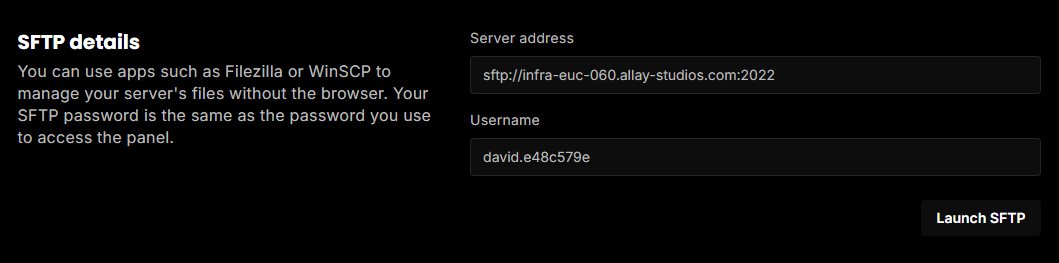
Under SFTP details, you will see the server address and your username.
3. Connect with WinSCP
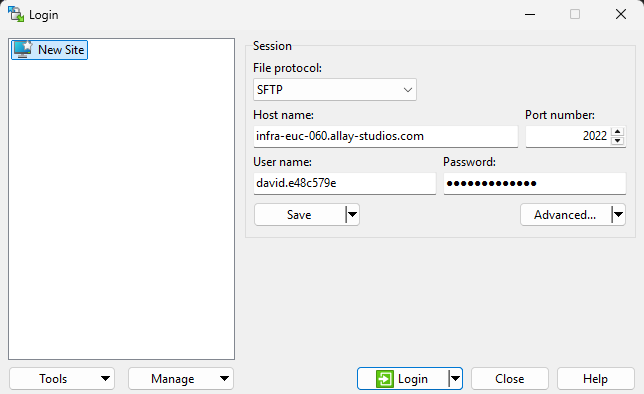
Section titled “3. Connect with WinSCP”Create a new connection in WinSCP and use the values from the SFTP details section.
| Field | Value |
|---|---|
| File protocol | SFTP |
| Host name | The host from the server address, without sftp:// |
| Port number | The port at the end of the server address |
| User name | The username shown in the panel |
| Password | Your own Game Panel password |